
This wasn’t as obvious as I expected. Under Zero Trust, I created an application matching my hostname, but it always wanted to send me a one time password when I accessed the URL.
Configuring the application, the Authentication section always enabled “One-time PIN” regardless of what I chose. The solution was relatively simple. I searched the Cloudflare community and the simple answer:
You can make a bypass rule for the source. All others will be blocked.
https://community.cloudflare.com/t/restrict-tunnel-access-without-authentication/605575
First I went to the “Access Groups” and created a group called allow-ips. I put into it the IP address/ranges that I did not want to restrict.
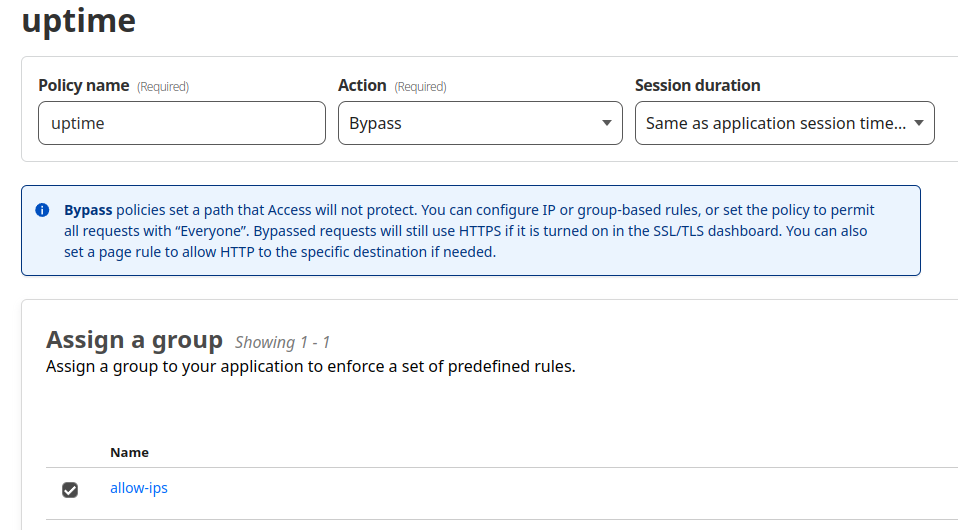
Then in my application I set up a policy with the action “Bypass” and assigned my allow-ips group.
Now I get the desired behaviour, everything not in my allow-ips group is denied.
What I found myself doing was creating two policies. First in the list is an “Allow” policy that excludes the allow-ips group, but requires “One-time PIN” for email addresses ending in my specified domain. This ensures that if you are not coming from an acceptable IP, you can still connect as long as you are a valid user, and can receive an email for the OTP. Now users don’t get denied, they get a prompt for email address and PIN, which they will only be able to satisfy if they are a valid user.