My living room has a Logitech Harmony remote that has never worked quite right, and the reason is simple. A Harmony doesn’t know what state anything is in. It only knows what it last told each device to do. Press “Watch Sky” and it fires off a sequence of IR commands and assumes they all landed. If the TV was already on, or the Sky box was already awake, or something else grabbed the screen half a minute later, the Harmony has no idea. The next press is built on a guess about the last one.
The killer was Sky. Its remote has a single power key that is a toggle, so “turn it on” can easily turn a box that was already on, off. I’d end up pressing buttons on the Harmony to fix what the Harmony had just done.
The other reason is simpler and less fixable: the Harmony has gone past end of life. There’s no way to reconfigure or reprogram it any more. Whatever it believes about my room is frozen, and every device I’ve added or changed since has been out of its reach. So even if the state problem had been solvable, this wasn’t something I could keep.
So the brief I gave Claude Code was: build me a Harmony replacement that knows the real state of the room. This post is what we ended up with over about two days, why each piece exists, and the many places it went wrong first.
What I’m Working With
Everything lives in one room and runs through one HDMI chain:
- an LG webOS TV, with all the audio going back out over ARC
- a Yamaha RX-V585 receiver, which is the actual switch for the sources
- a Sky Q Mini
- a PS5
- a Chromecast
- Kodi on an OSMC Vero 5
- an Intel NUC that acts as my home server, running Home Assistant and a Mosquitto broker in Docker
The code, the docs and the dashboard definitions all live in a private repository, and I’ve left every address, hostname and credential out of what follows.
The Plan: State, Intent, Control
The shape that came out of the first conversation is the part I’d keep if I did it again. Three things, kept apart:
- State. What is really happening, observed rather than remembered.
- Intent. What I want: the source I asked for, and whether something should defend it.
- Control. How to make reality match intent, preferring a device’s network API, then HDMI-CEC, and IR only as a last resort.
A Harmony fuses all three into “the last thing I sent”. Pulling them apart is the whole idea. The state side is where HDMI-CEC comes in, because every device on an HDMI chain announces what it’s doing on a shared bus: who claimed the screen, who woke up, who went to standby.
Step One: Can I Even See the Bus?
I’d assumed the NUC could be the CEC host. It couldn’t. Its HDMI output comes from a DisplayPort converter, and the kernel exposed no CEC device for it at all. The Vero 5, on the other hand, already sits on the chain and has a CEC block in its SoC, so it became the host.
I put a bus monitor on it and walked through the activities on the old remote, writing down which frames appeared. Some of what showed up was a surprise. When I switched to the Chromecast, it was the TV asking for it, not the Chromecast grabbing the screen as I’d assumed. The traffic that matters turned out to be a handful of opcodes: someone announcing themselves as the active source, the TV asking for a stream path, routing changes from the receiver, and the standby broadcast.
One early mistake is worth admitting. I’d given Claude my own idea of which input was which. It was partly wrong, and several early CEC tests “proved” nothing because they targeted the input that was already active. The receiver’s own input names, read from its API, were the authority. After that I stopped relying on my memory for anything a device could tell us itself.
Step Two: libcec Wouldn’t Talk
cec-client could monitor the bus, but it could not transmit. Every attempt to register as a device failed with “unable to open the device”. It reads the driver’s report of a self-poll as “address already taken”, for every address, including unused ones. A search found other owners hitting the same wall, and updating the OSMC kernel and packages made no difference.
Claude’s answer was to stop using libcec at all. Reading its source showed what it actually does to the Amlogic driver, and the kernel interface underneath turned out to be small and perfectly usable:
SYS_CTRL = 0x40044308  # CEC_IOC_SET_OPTION_SYS_CTRL
ADD_LA   = 0x4004430B  # CEC_IOC_ADD_LOGICAL_ADDR (value, not pointer); 15 releases

class Bus:
    def __init__(self, path="/dev/aocec"):
        self.fd = os.open(path, os.O_RDWR)
        fcntl.ioctl(self.fd, SYS_CTRL, 1)
        self.lock = threading.Lock()  # one transmit at a time

    def tx(self, frame):
        """Send one frame as its own initiator. True if ACKed."""
        with self.lock:
            fcntl.ioctl(self.fd, ADD_LA, frame[0] >> 4)
            try:
                return os.write(self.fd, frame) == len(frame)
            except OSError:
                return False
            finally:
                fcntl.ioctl(self.fd, ADD_LA, 15)

    def frames(self):
        p = select.poll()
        p.register(self.fd, select.POLLIN)
        while True:
            p.poll()  # blocks until a frame is readable
            d = os.read(self.fd, 32)
            if d:
                yield d
A frame is a header byte (initiator and destination), an opcode and parameters. write() returning the full length means a device ACKed it, and EPERM means nobody did. The controller only claims a logical address for the instant of each transmit and then lets it go, so otherwise it’s invisible on the bus.
CEC Could See Everything and Switch Nothing
With a working transmit path, the next test was the obvious one: make the room do something. It didn’t. A Set Stream Path frame is only valid from the TV, and the LG ignored the active-source claims I sent, at least as far as I could tell with the input labelling mistake in the way. So I asked Claude to try the Yamaha’s HTTP API instead, one call to set the input, and the picture and the sound both moved to Sky.
That was the moment the design clicked, and it’s also when I asked the question the whole project turns on: “so what we’re doing is controlling the Yamaha, not CEC?” Yes. CEC is the eyes: the live bus is the best source of truth for who’s on and who claimed the screen. The hands are each device’s own network API, because those are reliable and confirmable. I also wanted CEC as a fallback for when the Yamaha isn’t reachable, which remains one of the things I haven’t tested.
cecctl: Events, Not Polling
The result is cecctl, a small daemon on the Vero that owns the CEC device, keeps a live view of state, and exposes it over MQTT with Home Assistant discovery. How it is built mattered to me, and I pushed Claude on it several times:
- One owner of the device. My first version spawned a monitor beside the sender, and the two competed for frames. Replies to our own queries went to the monitor. Having one process own the file descriptor means every frame, including replies, comes to the one reader.
- Treat the bus as events. My first design polled each device for its power status on a timer. I pushed back with “why would we poll if we see CEC data?”. Now state comes from frames as they arrive (power replies, active-source claims, the TV’s standby broadcast), and a query only fills in the silent transitions, because a box going to sleep says nothing at all.
- No busy loops. I also asked for “events and blocking”, not a loop that wakes every few milliseconds. That surfaced a real finding: on this driver a bare
read()returns empty about every 48 ms when the bus is idle, so a “blocking” read is really a 25 Hz poll.poll()on the file descriptor waits properly (149 empty reads in six seconds versus two clean five-second timeouts), and idle wake-ups fell from around 530 to around 30 in 20 seconds. - A source lock. If I say “I want Sky” and something else holds the screen for more than three seconds (devices send bursts, so there’s a debounce), the controller switches back through the receiver’s API.
- Debug in the environment file. A small thing, but it was my direction: a switch for logging every frame belongs in
.env, not in the code.
Over MQTT it’s a handful of topics: a desired source, a lock on or off, wake and standby commands for the TV and PS5, a refresh, and retained state for the active source and each device’s power.
The Certificate That Had Already Expired
Securing the broker uncovered something I hadn’t asked about. The existing certificate had silently expired, because nothing was verifying it, and its CA was due to expire in a few years anyway. I had Claude create a new private CA with a long life, and a ten-year server certificate whose names include the one the Vero actually connects to. The CA’s private key got moved somewhere my backups really cover, after we discovered that the backup exclude file had a catch-all for dot-folders that quietly skipped the place I’d first put it. The cecctl user got an ACL that only allows its own topics.
Activities, and the Bugs Only a Cold Start Finds
Home Assistant scripts run the activities: wake the TV and receiver, wait for both, set the inputs, check the result. Running them from a completely cold state, everything off, found three bugs that testing from a warm state never would have:
- A fully-off LG isn’t “off” in Home Assistant, it’s
unavailable. My waits said “until not off”, which passed instantly. They need to wait foron. - When the TV wakes, it re-selects its last input. If that was the PS5, the PS5 wakes and claims the screen, and the TV ends up on the console while the receiver is on something else. Fix: leave the TV on the receiver’s input before powering it off.
- I misread a CEC refusal. Standing at the PS5’s logical address were two devices, the PS5 and something that answers every request with a
FeatureAbort. The “PS5 refuses standby” I thought I was seeing was the other device. The lesson, which I wrote into the project docs, is that CEC addressing is by logical address but identity is by physical address, so never conclude a device refused something without checking who answered.
The Sky Toggle, and Where CEC Couldn’t Help
This was the original grievance, and I’d assumed CEC would fix it: ask the Sky address for its power state, read the answer, and only press the toggle when needed. I tested it by putting Sky into standby and asking again. It still said “on”.
The answer came from a different physical address. The NUC, plugged into another receiver input, was sharing the Sky box’s logical address and answering every power query with “on” whatever Sky was doing. So the CEC reading was the NUC’s, not Sky’s. And when I tried the CEC power-on key on the Sky Q Mini in standby, the frame was acknowledged (by the NUC, presumably) but the Sky box didn’t wake. CEC could neither read nor command Sky’s power.
Sky’s own network interface could, though. It has a small HTTP API, and one field in it, activeStandby, reported real state in both situations. I checked it against a genuine standby and wake:
def sky_power(fetch=None):
    """'on' / 'standby' from the Sky box's own API, None if unreachable."""
    try:
        fetch = fetch or (lambda: urllib.request.urlopen(
            f"http://{SKY}:9006/as/system/information", timeout=3))
        return "standby" if json.load(fetch())["activeStandby"] else "on"
    except Exception:
        return None
cecctl now reads it on every refresh. The scripts check that sensor before touching the toggle, so a press only happens when the state says it should. Sky also wakes to its home screen, so waking it now starts three Back key presses, five seconds apart, which land on live TV. The key presses themselves travel over the network, through the integration Home Assistant already has for Sky Q. No IR.
My Own Test Turned the Telly Off
I owe an honest account of the worst mistake, because it’s the most useful one. After building the Sky logic I ran a cold-start test to prove it. Someone was watching television. The test turned the TV and receiver off, and, because the scripts trusted a stale Sky reading, it pressed the toggle and woke Sky instead of leaving it alone.
Two lessons came out of that, one about process and one about code.
The process lesson is simple: a test that changes devices someone might be using needs saying out loud before it runs, with the devices named.
The code lesson took reading the journal and the scheduling code to find. The scripts press “Refresh state” and wait a few seconds before they read the Sky sensor. But cecctl already schedules a delayed refresh eight seconds after any action, and my refresh code dropped any new request while one was pending. So an explicit “refresh now” got swallowed, the delayed one ran after the script had finished waiting, and the script read the old value. The fix is a scheduler where the earliest request wins:
class Once:
    """Runs fn once at the earliest requested time: a sooner request
    replaces a later pending one, a later one is ignored."""

    def __init__(self, fn):
        self.fn, self.timer, self.due, self.lock = fn, None, 0.0, threading.Lock()

    def at(self, delay=0):
        with self.lock:
            due = time.monotonic() + delay
            if self.timer and self.due <= due:
                return
            if self.timer:
                self.timer.cancel()
            self.due, self.timer = due, threading.Timer(delay, self._go)
            self.timer.start()

    def _go(self):
        with self.lock:
            self.timer = None
        self.fn()
Two more faults showed up in the cold tests afterwards:
- The receiver sometimes powers on to its ARC input late, after a script has already chosen another one, and nothing then corrected it. The scripts now check the receiver’s input at the end and say the wanted source again if needed.
- The lock’s “quiet period” was swallowing real steals. After the controller made a change itself, it ignored claims for ten seconds so it couldn’t ping-pong with a stubborn device. But a real steal in those ten seconds was ignored forever. Claims during the quiet period are now judged when it ends.
The Source Thief Was Hiding in Plain Sight
That NUC answering at Sky’s address was also the thief. It sent active-source claims, and it kept winning the screen. The kernel on it showed no CEC device whatsoever, so there was nothing in the operating system to stop. Unplugging its HDMI cable made it vanish from the bus, so the CEC was coming from the machine’s own hardware.
A search found the answer in the BIOS: an “HDMI CEC Control” option under the onboard devices. I updated the firmware (probably not needed) and turned the option off. With Sky in standby, three probes of the shared address then got no reply at all, where before the NUC had answered every time.
The TV still showed the old device name for that input afterwards, which I’m putting down to a cached label rather than a live device. It did what it was told regardless, so I haven’t chased it.
No IR: The Remote in Home Assistant
With the state and control layers working, the part you actually touch is a Home Assistant dashboard on my phone. Every device in the room has a network or CEC path, so the Broadlink I’d expected to need is sitting unused in this room.
It went through several designs before it felt right, and I’d rather describe the dead ends than pretend it came out in one go:
- Five separate pages along a tab bar was too many tabs.
- One long page with the current remote shown beneath the launchers was too much to scroll.
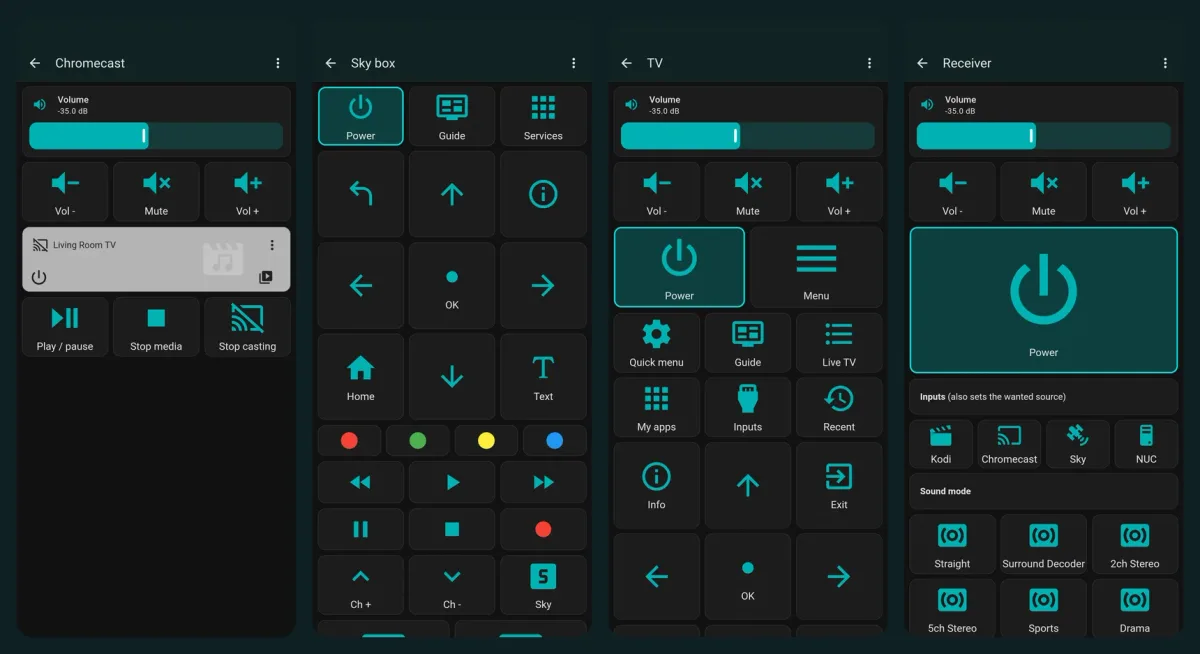
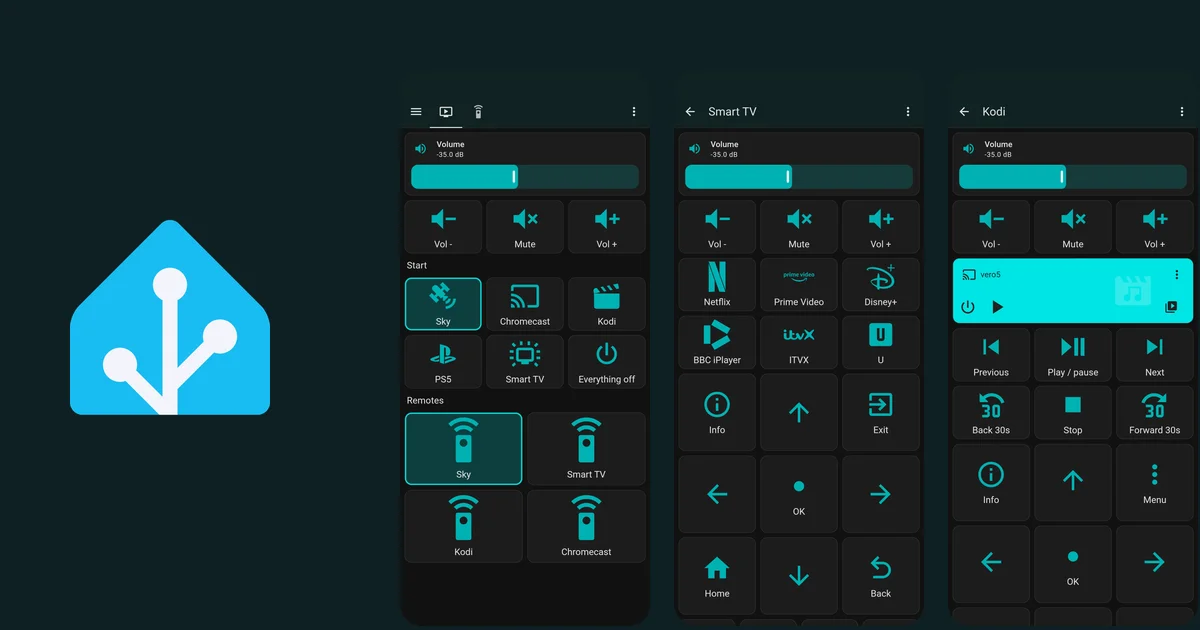
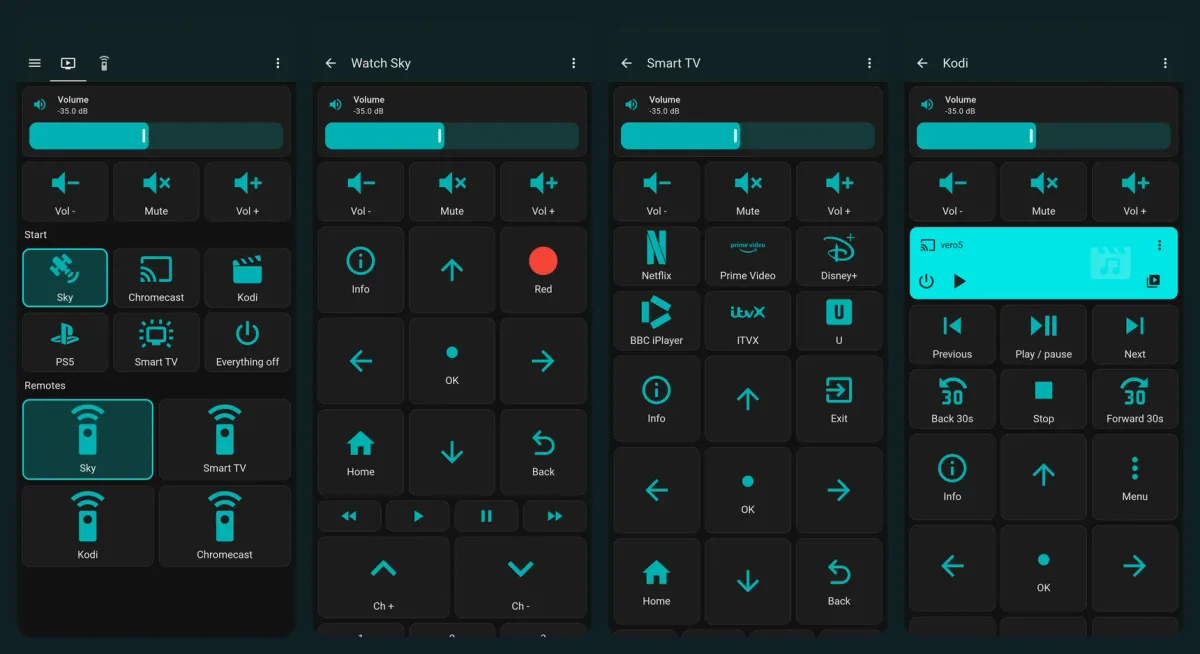
- What stuck is two menu tabs, Activities and Devices, each a short menu that opens a small remote page with a back arrow. The Harmony does the same: “Watch TV” has the buttons you reach for, and a separate devices section has every key.
- I wanted one tap to both start an activity and open its remote. HA’s button runs one action, and doing both needs an add-on that can navigate a browser. I chose two taps over a third-party dependency.
A few details that took iteration:
- Volume is always the receiver, in dB. Everything’s audio goes out over ARC, so the receiver is the only volume that matters. I first used a percentage slider, but I’m used to seeing the dB figure on the receiver’s display and its on-screen display. Home Assistant’s Yamaha integration exposes a Volume (dB) number entity, so the slider and the number are now one tile that matches the display. It has already earned its keep as a conversation piece: my nephew took one look at it and asked, “Why does it get louder when the number gets smaller?” Because decibels on a receiver count down from zero, so -35 dB is louder than -50 dB. It’s a fair question, and a fair reminder that the number I find familiar isn’t intuitive to everyone else in the room.
- The highlight comes from real state. A template sensor works out what is really on screen from the TV’s input and the receiver’s input, not from what a button last asked for, and the matching buttons outline themselves. Here it is, trimmed a little:
- sensor:
    - unique_id: media_activity
      name: "Media activity"
      state: >-
        {% set src = state_attr('media_player.living_room_tv', 'source') %}
        {% set rx = state_attr('media_player.yamaha_receiver', 'source') %}
        {% if not is_state('media_player.living_room_tv', 'on') %}off
        {% elif src in ['PS5', 'HDMI 1'] %}ps5
        {% elif src == 'HDMI 2' and rx == 'HDMI3' %}sky
        {% elif src == 'HDMI 2' and rx == 'HDMI1' %}kodi
        {% elif src == 'HDMI 2' and rx == 'HDMI2' %}chromecast
        {% elif src in ['HDMI 2', 'HDMI 3', 'HDMI 4'] %}other
{% else %}smart_tv{% endif %}- Smart TV is inferred. If the TV isn’t on an HDMI input it must be on the launcher or an app, so the sensor can’t tell Netflix from iPlayer. That’s an honest limit.
- Power is one button with state. A separate “on” and “off” for each device read like a Harmony. Now each device has a single Power button that’s outlined while it’s on. For Sky the press is still a toggle underneath, but the real state is known, so the button is honest about it, and a wake also starts the three Back presses.
- The d-pad has the utility keys in its corners. I’d first padded the 3x3 grid with blank tiles, then tried making Up and Down wide. Neither was good. Using the four corners for Info and Red (or Exit, or Menu) and Home and Back made the grid denser and removed a whole row.
- Brand icons. Home Assistant’s standard icon set has no Prime Video, BBC iPlayer, ITVX or Disney+ marks, so that button was simply blank. An Iconify icon-set pack I already had on the machine had them as single-path marks, so a small JavaScript file registers them as a custom icon set, and the app buttons use
brand:primevideoand so on. Two buttons had been colour-tinted at first, which looked wrong beside the rest, so they all use the same colour now.
Kodi Without Kore, and Stop Casting
I normally control Kodi with Kore, which is excellent, but I wanted a way for the rest of the household to control it from the same single interface. Home Assistant already has a Kodi integration that speaks the same JSON-RPC as Kore, so there’s nothing new on the Vero. The Kodi page has now-playing, transport, a d-pad, and subtitle and audio-track buttons, all through kodi.call_method.
The Chromecast page exists for one reason: once something is casting, finding how to stop it can be a mission. For a cast player in Home Assistant, turn off quits the app that’s casting, which is exactly the practical meaning of “stop casting”, so that’s what the Stop casting button does. I also got this one wrong first: I pointed the page at the older-model Chromecast, which turned out to be the bedroom one. The living room has a newer Ultra. Cast devices have similar names, so I now identify them by model and address, then confirm with whoever lives with them.
Letting the Rest of the Household In
Giving other people access to Home Assistant means a restricted account, and I wanted it to see only the TV dashboard. Home Assistant can hide things but not truly wall them off: a normal user can’t change settings or reach developer tools, and I set the other dashboards to admin-only so they vanish for that account. But hiding a panel isn’t a security boundary, and anyone signed in can still call any service through the API. I wrote that down plainly in the docs, because it’s the sort of thing that’s easy to forget a few months later.
Home Assistant is reachable from outside through a Cloudflare tunnel, which makes the failed-login ban awkward. The tunnel runs on the same machine and connects to Home Assistant on localhost, so by default every outside visitor looks like 127.0.0.1, and turning on a ban would ban the tunnel itself and lock everyone out. The safe order is:
- Tell Home Assistant to trust the tunnel as a proxy and read the visitor’s address from the forwarded header.
- Make a couple of failed logins and check the log shows your address, not localhost. It did, matching what Cloudflare reported for me.
- Only then switch the ban on, at five failed attempts.
I haven’t deliberately triggered a ban, since it would block everyone sharing my home’s public address until I cleared it by hand, so that remains configured but unproven.
The other security story was the Kodi web password, which defaults to a well-known value anyone on the network could use. I changed it by setting it through Kodi’s own live API, and that crashed Kodi. The service restarted itself and the password was unchanged. Doing it properly meant stopping Kodi, editing its settings file, and starting it again. Home Assistant’s Kodi integration also has no re-authentication flow, so I removed the entry and added it again, which briefly gave the entity a different name until I renamed it back.
Working With Claude Code on This
The pattern that worked for this project looks a lot like the pattern in my other Claude Code posts, with a few additions:
- The first answer is usually valid but not the right shape. Polling for power status, spawning a monitor beside the sender, a busy
read()loop: each was a reasonable first pass that fell over on a real constraint I only knew from living with it. - Read-only first. The most useful habit was checking the state of things before changing them: what does the device report, what does the integration offer, what does the file look like. Nearly every wrong turn above came from guessing, and nearly every fix from looking.
- It says what it hasn’t verified. The project’s README has a verified table and a not-yet-verified list, and I asked for both to stay honest. There’s no shortage of things in this post that are built and deployed but not yet seen working on the real hardware.
- It records mistakes as findings. The shared logical address, the TV re-selecting its last input, the dropped refresh, the Kodi crash: each of those went into the project documentation as a fact someone else would otherwise have to rediscover.
- Documentation and screenshots are part of the job. The repo has a findings file, a build log with the mistakes in it, a security page, and phone screenshots of every page, each checked for anything personal before being committed.
What I Haven’t Proved Yet
I’d rather say it than have you find it:
- The Watch Smart TV script, including whether the receiver’s ARC input gives TV sound.
- The new Power buttons for Sky and the TV, and the Kodi navigation, subtitle and audio buttons, plus Stop casting.
- The CEC fallback for when the Yamaha’s API isn’t reachable.
- The lock correcting a real source steal, now that the thief has been silenced at the source.
- An actual failed-login ban.
Where It Stands
The room now knows what’s on, because it asks the devices instead of remembering. Sky wakes once and lands on live TV, the activity buttons light up for what’s really on screen, the volume matches the receiver’s display, the household has a restricted login set up to open on the TV page, and stopping a cast is one clearly labelled button. It isn’t finished, and the list above is the proof. But the central idea has held up: the thing that kept going wrong with the Harmony was guessing, and this one doesn’t guess.