
I’ve been tasked with an electronics project to scan NFC/RFID devices. Electronics is very new to me. I can handle the bit where I know what I want to build, and the probably coding to program things, but knowing what resistors, capacitors sizes or LED’s is all new to me.
I started out looking at an MFRC522 device with an Arduino Nano and after successfully getting that scanning and processing I found I had a few problems with what I wanted to do. The way I was connecting to the Nano using SPI left me with few pins left for other tasks, especially as I wanted a keypad and buzzer. But the real crunch came when wanting to use the Nano to communicate securely over TLS. It’s poor little brain can’t cope with that.
I happen to have a few SBC’s knocking about, a few ESP8266’s, RPi Zero, RPi3 and an ESP32-WROOM. The ESP8226 are too small with not enough GPIO for me, the RPi’s are probably over kill for what I need. The Goldilocks SBC seems to be the ESP32, lots of processing power and lots of flexible GPIO pins. All I need to do now is figure out how to wire stuff together.
Starting with these two devices, ESP32-WROOM and the PN532 from Elechouse, let’s see if we can get them scanning tags and cards.
Physical Setup
The ESP32-WROOM is way too big for my breadboard. It only leaves one row of pins accessible on one side of the board. My fix for this is going to have to be cut a breadboard in half down the middle so the ESP32 can sit on it and give me enough pins to work with on both sides.
Now it looks like there’s a few ESP32-WROOM-32 Devkit boards so finding one with the right pin outs was tricky. Turns out mine is a DevKit v1 as it has the GND and 3.3v bottom left like this:
ESP32-WROOM-32 DevKit v1
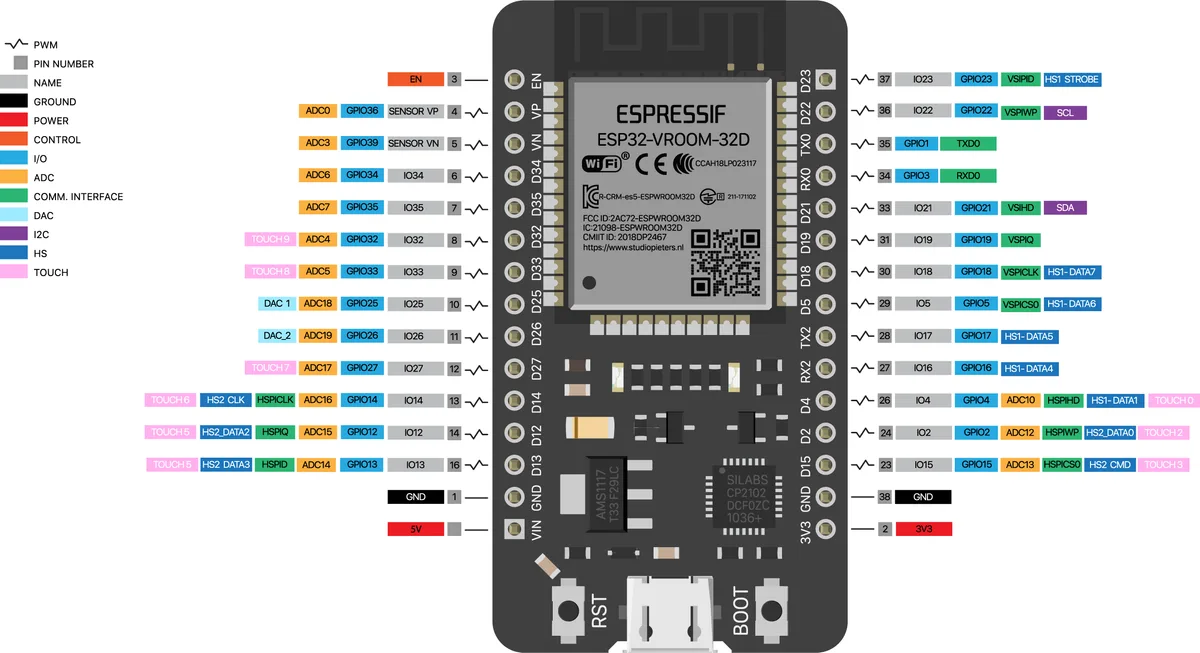
The NFC scanner I have is the PN532 and can be configured to communicate using SPI, I2C or High Speed UART. I want to look at I2C to reduce the number of pins I use. This means I have to set the dip switches o nthe board to 1: ON, 2: OFF. It’s printed on the board if you have a magnifying glass.
PN532
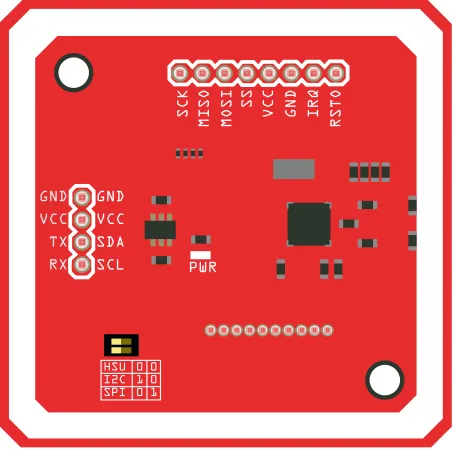
I also need to solder on some header pins and for I2C to connect the pins GND, VCC, SDA and SCL.
Connecting the two together was eventually simple after finding the right pins.
| ESP32 | PN532 |
| D22 | SCL |
| D21 | SCA |
| 3V3 | VCC |
| GND | GND |
Connections
NOTE: Although the PN532 wants 5v I’m using only 3.3v. There is no 5v on the ESP32 unless I use the VIN pin that is 5v when a USB cable is connected.
Software Setup
I’m using the Arduino IDE to program my ESP32. For this you need to download the board drivers from here: https://github.com/espressif/arduino-esp32
I found the easiest way to do this was to go into File > Preferences and paste the URL
https://raw.githubusercontent.com/espressif/arduino-esp32/gh-pages/package_esp32_dev_index.json
Into the “Additional Boards Manager URLs”
Then go to Tools > Board > Boards Manager… and search and install the “esp32” boards. It’ll download what it needs, and then you can choose the board you have in Tools > Boards > ESP32 Arduino. For mine, I chose “NodeMCU-32S”.
Libraries
I need to include the PN532 libraries, so I can write my Arduino code. You can get the necessary libraries from here: https://github.com/elechouse/PN532. Make sure you copy the folders into your libraries folder. For me this was under my home folder in ~/Arduino/libraries, eg.
~/Arduino/libraries
  ├── NDEF
  ├── PN532
  └── PN532_I2C
I only needed these folders as I’m not using the HSU or SPI versions.
Arduino Code
Using the following Arduino code, I was able to get data from the NFC scanner using a sample card or tag. If I unlock my mobile phone, I can scan a code from that too.
// esp32-wroom-32 devkit v1 default pins
//       SCL D22
//       SDA D21

// Define the interface type
#if 0
#include <SPI.h>
#include <PN532_SPI.h>
#include "PN532.h"
PN532_SPI pn532spi(SPI, 10);
PN532 nfc(pn532spi);

#elif 0
#include <PN532_HSU.h>
#include <PN532.h>
PN532_HSU pn532hsu(Serial1);
PN532 nfc(pn532hsu);

#else
#include <Wire.h>
#include <PN532_I2C.h>
#include <PN532.h>
#include <NfcAdapter.h>

PN532_I2C pn532i2c(Wire);
PN532 nfc(pn532i2c);
#endif

volatile bool connected = false;

void setup(void)
{
  Serial.begin(115200);
  Serial.println("*** Testing Module PN532 NFC RFID ***");
}

void loop(void)
{
  boolean success;
  // Buffer to store the UID
  uint8_t uid[] = { 0, 0, 0, 0, 0, 0, 0 };
  // UID size (4 or 7 bytes depending on card type)
  uint8_t uidLength;

  while (!connected) {
    connected = connect();
  }

  // Wait for an ISO14443A type cards (Mifare, etc.).  When one is found
  // 'uid' will be populated with the UID, and uidLength will indicate
  // if the uid is 4 bytes (Mifare Classic) or 7 bytes (Mifare Ultralight)
  success = nfc.readPassiveTargetID(PN532_MIFARE_ISO14443A, &uid[0], &uidLength);

  // If the card is detected, print the UID
  if (success)
  {
    Serial.println("Card Detected");
    Serial.print("Size of UID: "); Serial.print(uidLength, DEC);
    Serial.println(" bytes");
    Serial.print("UID: ");
    for (uint8_t i = 0; i < uidLength; i++)
    {
      Serial.print(" 0x"); Serial.print(uid[i], HEX);
    }
    Serial.println("");
    Serial.println("");

    delay(1000);
    connected = connect();
  }
  else
  {
    // PN532 probably timed out waiting for a card
    // Serial.println("Timed out waiting for a card");
  }
}

bool connect() {

  nfc.begin();

  // Connected, show version
  uint32_t versiondata = nfc.getFirmwareVersion();
  if (! versiondata)
  {
    Serial.println("PN53x card not found!");
    return false;
  }

  //port
  Serial.print("Found chip PN5"); Serial.println((versiondata >> 24) & 0xFF, HEX);
  Serial.print("Firmware version: "); Serial.print((versiondata >> 16) & 0xFF, DEC);
  Serial.print('.'); Serial.println((versiondata >> 8) & 0xFF, DEC);

  // Set the max number of retry attempts to read from a card
  // This prevents us from waiting forever for a card, which is
  // the default behaviour of the PN532.
  nfc.setPassiveActivationRetries(0xFF);

  // configure board to read RFID tags
  nfc.SAMConfig();

  Serial.println("Waiting for card (ISO14443A Mifare)...");
  Serial.println("");

  return true;
}
What I want to achieve is way more complex than this, but it’s a simple start.
References
https://randomnerdtutorials.com/esp32-i2c-communication-arduino-ide/
https://www.arduinoecia.com.br/modulo-pn532-nfc-rfid-arduino/