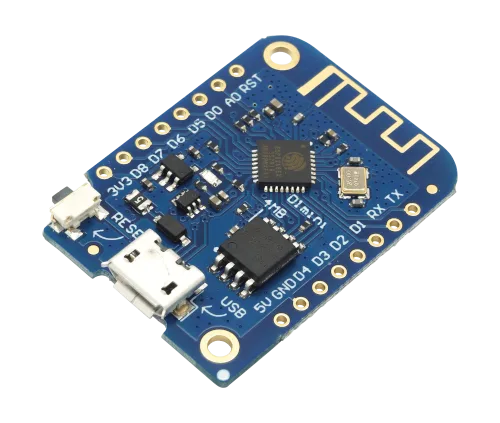
I just soldered some headers onto my Wemos Lolin ESP8266, and my soldering skills aren’t what they should be. Then I hooked it up to my Linux PC and tried to see if it worked as it should… nope.
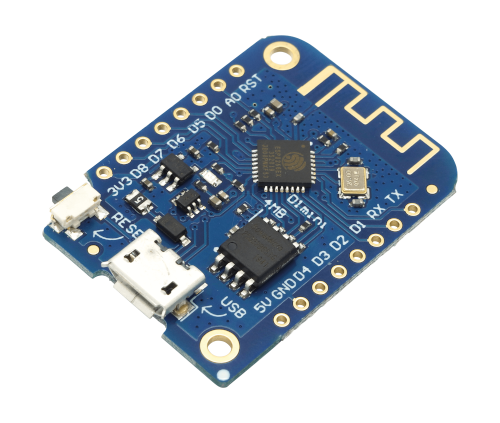
Have I borked it with my dodgy soldering? Let’s buy some more boards and see if they work. After plugging in a new one I felt better as I’d bought some pre-soldered units, and they did exactly the same thing.
kernel: ch341-uart ttyUSB0: ch341-uart converter now disconnected from ttyUSB0Thankfully after quite a bit of Duck Fu I was able to come up with an answer.
I looked at my logs and cried (I pasted in quite a lot to ensure a search engine found what you needed):
Oct 12 17:03:45 detective kernel: audit: type=1130 audit(1634054625.623:944): pid=1 uid=0 auid=4294967295 ses=4294967295 msg='unit=brltty-device@sys-devices-pci0000:00-0000:00:14.0-usb1-1\x2d9-1\x2d9.2 comm="systemd" exe="/usr/lib/systemd/systemd" hostname=? addr=? terminal=? res=success'
Oct 12 17:03:45 detective brltty-systemd-wrapper[8635]: executing command: brltty -E -n
Oct 12 17:03:45 detective brltty[8632]: BRLTTY 6.4 rev BRLTTY-6.4 [https://brltty.app/]
Oct 12 17:03:45 detective brltty[8632]: executing as the invoking user: brltty
Oct 12 17:03:45 detective brltty[8632]: CLDR open error: No such file or directory: /usr/share/unicode/cldr/common/annotations/en.xml
Oct 12 17:03:45 detective brltty[8632]: possible cause: the package that defines the CLDR annotations directory is not installed
Oct 12 17:03:45 detective brltty[8632]: emoji substitutiion won't be performed
Oct 12 17:03:45 detective brltty[8632]: BrlAPI Server: release 0.8.3
Oct 12 17:03:45 detective systemd[1]: Started BRLTTY Instance: /sys/devices/pci0000:00/0000:00:14.0/usb1/1-9/1-9.2.
Oct 12 17:03:45 detective audit[1]: SERVICE_START pid=1 uid=0 auid=4294967295 ses=4294967295 msg='unit=brltty@-sys-devices-pci0000:00-0000:00:14.0-usb1-1\x2d9-1\x2d9.2 comm="systemd" exe="/usr/lib/systemd/systemd" hostname=? addr=? terminal=? res=success'
Oct 12 17:03:45 detective kernel: audit: type=1130 audit(1634054625.643:945): pid=1 uid=0 auid=4294967295 ses=4294967295 msg='unit=brltty@-sys-devices-pci0000:00-0000:00:14.0-usb1-1\x2d9-1\x2d9.2 comm="systemd" exe="/usr/lib/systemd/systemd" hostname=? addr=? terminal=? res=success'
Oct 12 17:03:45 detective brltty[8632]: USB configuration set error 16: Device or resource busy
Oct 12 17:03:45 detective brltty[8632]: USB interface in use: 0 (ch341)
Oct 12 17:03:45 detective brltty[8632]: another BrlAPI server is already listening on 0 (file /var/lib/BrlAPI/.0 exists)
Oct 12 17:03:45 detective brltty[8632]: error while creating socket 0
Oct 12 17:03:45 detective brltty[8632]: USB control transfer error 32: Broken pipe
Oct 12 17:03:45 detective brltty[8632]: NoSpeech Speech Driver:
Oct 12 17:03:45 detective ModemManager[605]: <info>  [base-manager] port ttyUSB0 released by device '/sys/devices/pci0000:00/0000:00:14.0/usb1/1-9/1-9.2'
Oct 12 17:03:45 detective ModemManager[605]: <info>  [base-manager] couldn't check support for device '/sys/devices/pci0000:00/0000:00:14.0/usb1/1-9/1-9.2': Operation was cancelled
Oct 12 17:03:45 detective kernel: usb 1-9.2: usbfs: interface 0 claimed by ch341 while 'brltty' sets config #1
Oct 12 17:03:45 detective kernel: ch341-uart ttyUSB0: ch341-uart converter now disconnected from ttyUSB0
Oct 12 17:03:45 detective kernel: ch341 1-9.2:1.0: device disconnected
Oct 12 17:03:46 detective brltty[8632]: Linux Screen Driver:
Oct 12 17:03:46 detective kernel: input: BRLTTY 6.4 Linux Screen Driver Keyboard as /devices/virtual/input/input41
Oct 12 17:03:46 detective systemd-logind[545]: Watching system buttons on /dev/input/event20 (BRLTTY 6.4 Linux Screen Driver Keyboard)
Oct 12 17:03:46 detective /usr/lib/gdm-x-session[3420]: (II) config/udev: Adding input device BRLTTY 6.4 Linux Screen Driver Keyboard (/dev/input/event20)
Oct 12 17:03:46 detective /usr/lib/gdm-x-session[3420]: (**) BRLTTY 6.4 Linux Screen Driver Keyboard: Applying InputClass "evdev keyboard catchall"
Oct 12 17:03:46 detective /usr/lib/gdm-x-session[3420]: (**) BRLTTY 6.4 Linux Screen Driver Keyboard: Applying InputClass "libinput keyboard catchall"
Oct 12 17:03:46 detective /usr/lib/gdm-x-session[3420]: (**) BRLTTY 6.4 Linux Screen Driver Keyboard: Applying InputClass "system-keyboard"
Oct 12 17:03:46 detective /usr/lib/gdm-x-session[3420]: (**) BRLTTY 6.4 Linux Screen Driver Keyboard: Applying InputClass "Keyboard Defaults"
Oct 12 17:03:46 detective /usr/lib/gdm-x-session[3420]: (II) Using input driver 'libinput' for 'BRLTTY 6.4 Linux Screen Driver Keyboard'
Oct 12 17:03:46 detective /usr/lib/gdm-x-session[3420]: (II) systemd-logind: got fd for /dev/input/event20 13:84 fd 44 paused 0
Oct 12 17:03:46 detective /usr/lib/gdm-x-session[3420]: (**) BRLTTY 6.4 Linux Screen Driver Keyboard: always reports core events
Oct 12 17:03:46 detective /usr/lib/gdm-x-session[3420]: (**) Option "Device" "/dev/input/event20"
It turns out this is to do with udev stealing the device, thinking it’s some kind of braille terminal.
Although not related to the board/chip I’m using, it’s the same problem:
To resolve it I removed the rules, reloaded udev and disabled brltty.
sudo rm /usr/lib/udev/rules.d/90-brltty-*.rules
sudo udevadm control --reload-rules
sudo systemctl mask brltty.path
Unplug the board and reconnect and I can use esptool.py to check if my board is on a serial port.
$ esptool.py read_flash_status
esptool.py v3.1
Found 2 serial ports
Serial port /dev/ttyUSB0
Connecting….
Detecting chip type… ESP8266
Chip is ESP8266EX
Features: WiFi
Crystal is 26MHz
MAC: a8:48:fa:c0:2a:c3
Uploading stub…
Running stub…
Stub running…
Status value: 0x0202
Hard resetting via RTS pin…
I can now retrieve the other board from the bin and check that it’s not my soldering :)