
I used Homarr for a while as the dashboard in front of my Servarr apps, but it kept failing on me, so I moved to Homepage instead.
The trade-off going in is that Homepage takes a lot more setting up than Homarr. Homarr is configured through its own web UI - add a tile, point it at a service, done. Homepage has no UI for any of that. Everything - the services it shows, the bookmarks, the widgets, even the layout - lives in a handful of YAML files that you edit directly and the container picks up.
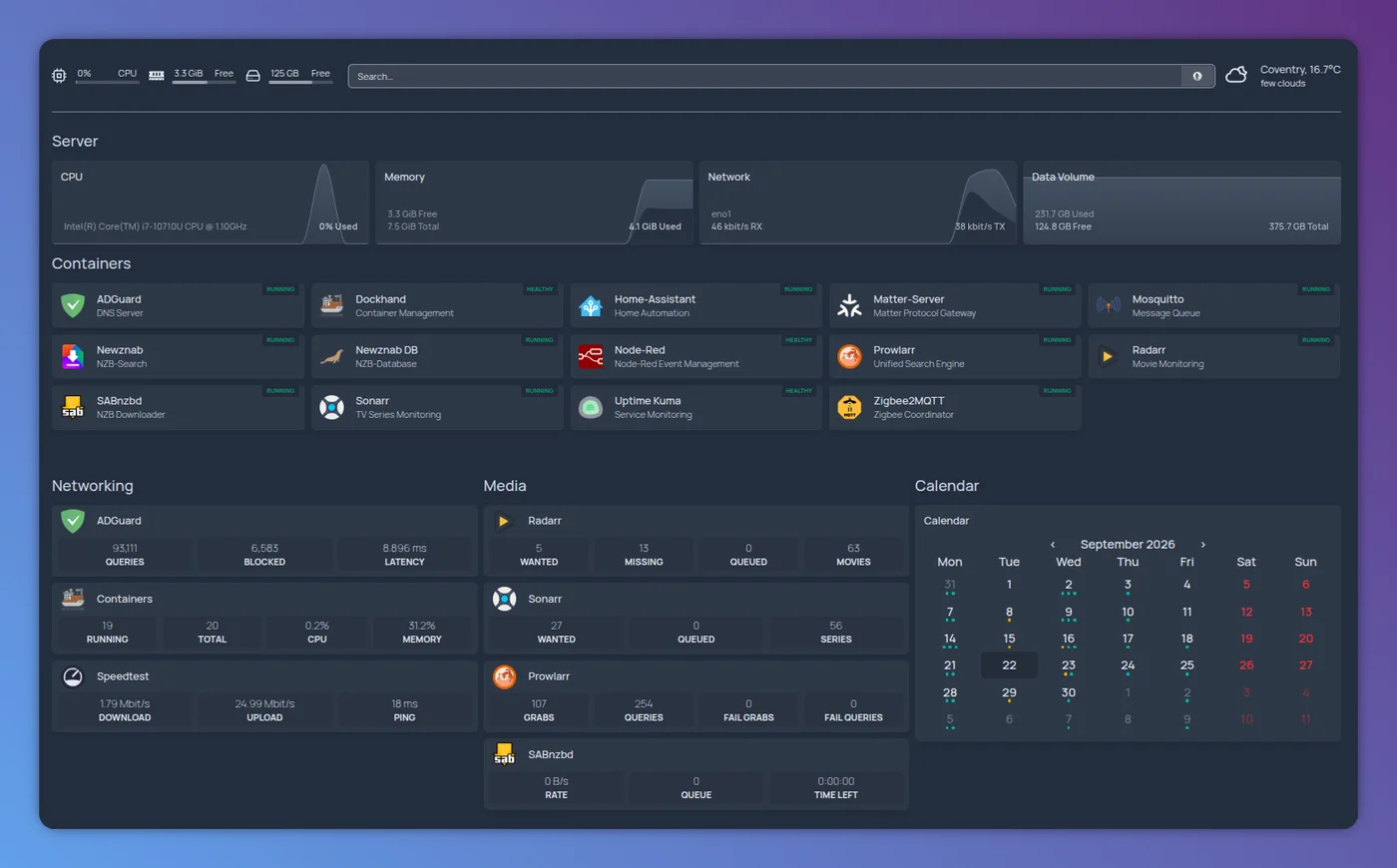
Here’s what it actually looks like once it’s all wired up:
Running It
Here’s the compose file I run it with:
services:
  homepage:
    image: ghcr.io/gethomepage/homepage:latest
    container_name: homepage
    ports:
      - 3004:3000
    volumes:
      - ${PWD}/config:/app/config # Make sure your local config directory exists
      - /var/run/docker.sock:/var/run/docker.sock:ro # (optional) For docker integrations
    restart: unless-stopped
    environment:
      HOMEPAGE_ALLOWED_HOSTS: ${HOMEPAGE_ALLOWED_HOSTS}
  glances:
    image: nicolargo/glances:latest
    restart: unless-stopped
    pid: host
    network_mode: host
    volumes:
      - /var/run/docker.sock:/var/run/docker.sock:ro
      - /mnt/data:/mnt/data:ro
    environment:
      - GLANCES_OPT=-w
The Docker socket mount is optional - it lets Homepage auto-discover containers and their labels rather than you having to list every service by hand. Glances runs alongside it in its own container, in web-server mode (-w), and Homepage’s glances widget talks to that over HTTP for the system stats further down.
Configuring the Dashboard
The config directory is where the actual setup happens - settings.yaml for overall layout, bookmarks.yaml for plain links, docker.yaml for Docker host credentials, and services.yaml for the dashboard itself: the services, grouped into sections, each with an icon and, optionally, a live widget.
This is the bulk of my services.yaml, with the credentials taken out:
- Networking:
    - ADGuard:
        href: https://ns0.mydomain.com
        icon: adguard-home.png
        widget:
          type: adguard
          url: https://ns0.mydomain.com
          fields: ["queries", "blocked", "latency"]
          username: admin
          password: your-adguard-password
    - Containers:
        href: http://192.168.1.10:3030
        icon: dockhand.png
        widget:
          type: dockhand
          url: http://192.168.1.10:3030
    - Speedtest:
        href: http://192.168.1.10:5216
        icon: myspeed.png
        widget:
          type: myspeed
          url: http://192.168.1.10:5216

- Media:
    - Radarr:
        href: https://blackpearl.mydomain.com/movies/
        icon: radarr.png
        widget:
          type: radarr
          url: https://blackpearl.mydomain.com/movies/
          key: your-radarr-api-key
    - Sonarr:
        href: https://blackpearl.mydomain.com/tv/
        icon: sonarr.png
        widget:
          type: sonarr
          url: https://blackpearl.mydomain.com/tv/
          key: your-sonarr-api-key
    - Prowlarr:
        href: https://blackpearl.mydomain.com/search/
        icon: prowlarr.png
        widget:
          type: prowlarr
          url: https://blackpearl.mydomain.com/search/
          key: your-prowlarr-api-key
    - SABnzbd:
        href: http://192.168.1.10:8080
        icon: sabnzbd.png
        widget:
          type: sabnzbd
          url: http://192.168.1.10:8080
          key: your-sabnzbd-api-key

- Calendar:
    - Calendar:
        widget:
          type: calendar
          firstDayInWeek: monday
          view: monthly
          maxEvents: 10
          showTime: true
          integrations:
            - type: sonarr
              service_group: Media
              service_name: Sonarr
              color: teal
              baseUrl: https://blackpearl.mydomain.com/tv
            - type: radarr
              service_group: Media
              service_name: Radarr
              color: yellow
              baseUrl: https://blackpearl.mydomain.com/movies

- Server:
    - CPU:
        widget:
          type: glances
          url: http://192.168.1.10:61208
          version: 4
          metric: cpu
          refreshInterval: 5000
    - Memory:
        widget:
          type: glances
          url: http://192.168.1.10:61208
          version: 4
          metric: memory
          refreshInterval: 5000
    - Network:
        widget:
          type: glances
          url: http://192.168.1.10:61208
          version: 4
          metric: network:eno1
          refreshInterval: 5000
    - "Data Volume":
        widget:
          type: glances
          url: http://192.168.1.10:61208
          version: 4
          metric: fs:/mnt/data
          refreshInterval: 5000
That’s four groups doing quite different jobs:
- Networking - AdGuard’s query stats, a container manager, and a speedtest history tool, each pulling live numbers rather than just linking out.
- Media - Radarr, Sonarr, Prowlarr and SABnzbd, each with a widget hitting the app’s own API for its own kind of activity.
- Calendar - a single combined view built from the
integrationslist, pulling upcoming releases out of Sonarr and Radarr onto one calendar rather than checking each app separately. - Server - four Glances widgets against the same URL, each pinned to one
metric(CPU, memory, a named network interface, a filesystem path), for a resource strip across the bottom of the dashboard.
That password and those key values are real credentials for the service they sit next to - an AdGuard admin password, and the Sonarr/Radarr/Prowlarr/SABnzbd API keys, all found in each app’s own settings. I’ve blanked mine out above; Homepage also supports pulling values like this out of a separate secrets file instead of writing them into services.yaml directly, worth doing if the file ever ends up somewhere more shared than your own machine.
Putting It Behind Caddy
All of this sits behind Caddy on the same host, one site block covering Homepage and every app it links to:
blackpearl.mydomain.com {
#  error 503 # Maintenance Mode

  redir /tv /tv/
  redir /movies /movies/
  redir /books /books/
  redir /search /search/
  redir /watch /watch/
  redir /sabnzbd /sabnzbd/
  redir /grafana /grafana/
  redir /access /access/

#  import waf

  reverse_proxy /* {
    to 127.0.0.1:3004
    health_uri http://127.0.0.1:3004/
  }
  reverse_proxy /tv/* {
    to 127.0.0.1:8989
    health_uri http://127.0.0.1:8989/tv
  }
  reverse_proxy /movies/* {
    to 127.0.0.1:7878
    health_uri http://127.0.0.1:7878/movies
  }
  reverse_proxy /books/* {
    to 127.0.0.1:8787
    health_uri http://127.0.0.1:8787/books
  }
  reverse_proxy /search/* {
    to 127.0.0.1:9696
    health_uri http://127.0.0.1:9696/search
  }
  reverse_proxy /watch/* {
    to 127.0.0.1:3080
    health_uri http://127.0.0.1:3080
  }
  reverse_proxy /sabnzbd/* {
    to 127.0.0.1:8080
    health_uri http://127.0.0.1:8080/sabnzbd/
  }
  reverse_proxy /grafana/* {
    to 127.0.0.1:3001
    health_uri http://127.0.0.1:3001/grafana/
  }

  handle /access/* {
    root * /usr/share/caddy/html/access
    try_files * /index.html
    file_server
  }

  reverse_proxy /ws {
    to 127.0.0.1:7890
  }

  tls {
    dns cloudflare {$CLOUDFLARE_API_KEY}
    resolvers 1.1.1.1
  }

  handle_errors {
    root * /usr/share/caddy/html
    @custom_err file /{err.status_code}.html /50x.html
    handle @custom_err {
      rewrite * {file_match.relative}
      file_server
    }
    respond "{err.status_code} {err.status_text}"
  }

  #import subdomain-log blackpearl.mydomain.com

}
The root path (/*) goes to Homepage on 3004, the same host port from the compose file above, and everything else is a path-based route to one of the Servarr apps or another service on the same box, each with its own health_uri so Caddy knows if it’s actually up. The tls block gets its certificate via a DNS challenge against Cloudflare, with the API token coming from an environment variable rather than sitting in the file, and handle_errors serves a custom page instead of Caddy’s default when something behind it is down.
References
See also: Servarr Apps