Infrared is one-way. You send a code and hope. The fans in my house have a remote, a Broadlink box that can send the same codes, and nothing that can tell me whether the fan is actually running. For a long time that was fine, because I only ever pressed buttons.
Then I put the same fans into two places. Home Assistant sent the codes directly through the Broadlink boxes. Google Home reached the same boxes through the Broadlink app’s cloud link. Each had its own idea of whether the fan was on. Tell Google to turn the fan off and Home Assistant still showed it running, and a tap on the dashboard then sent the toggle code to a fan that was already off.
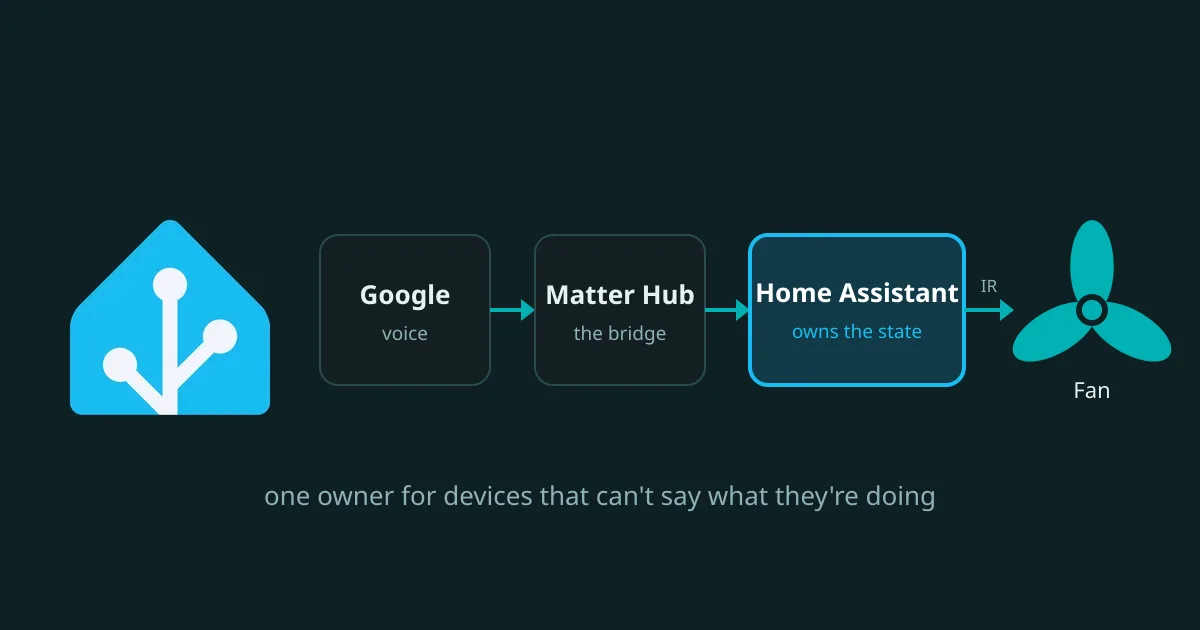
This post is about how I fixed that by making Home Assistant the single owner of the state, and using Home Assistant Matter Hub (HAMH) to hand Google Home a view of it. Claude Code did the building. I did a lot of pressing buttons on a fan remote while it counted.
What’s Being Controlled
Three identical ceiling fans, each with a light.
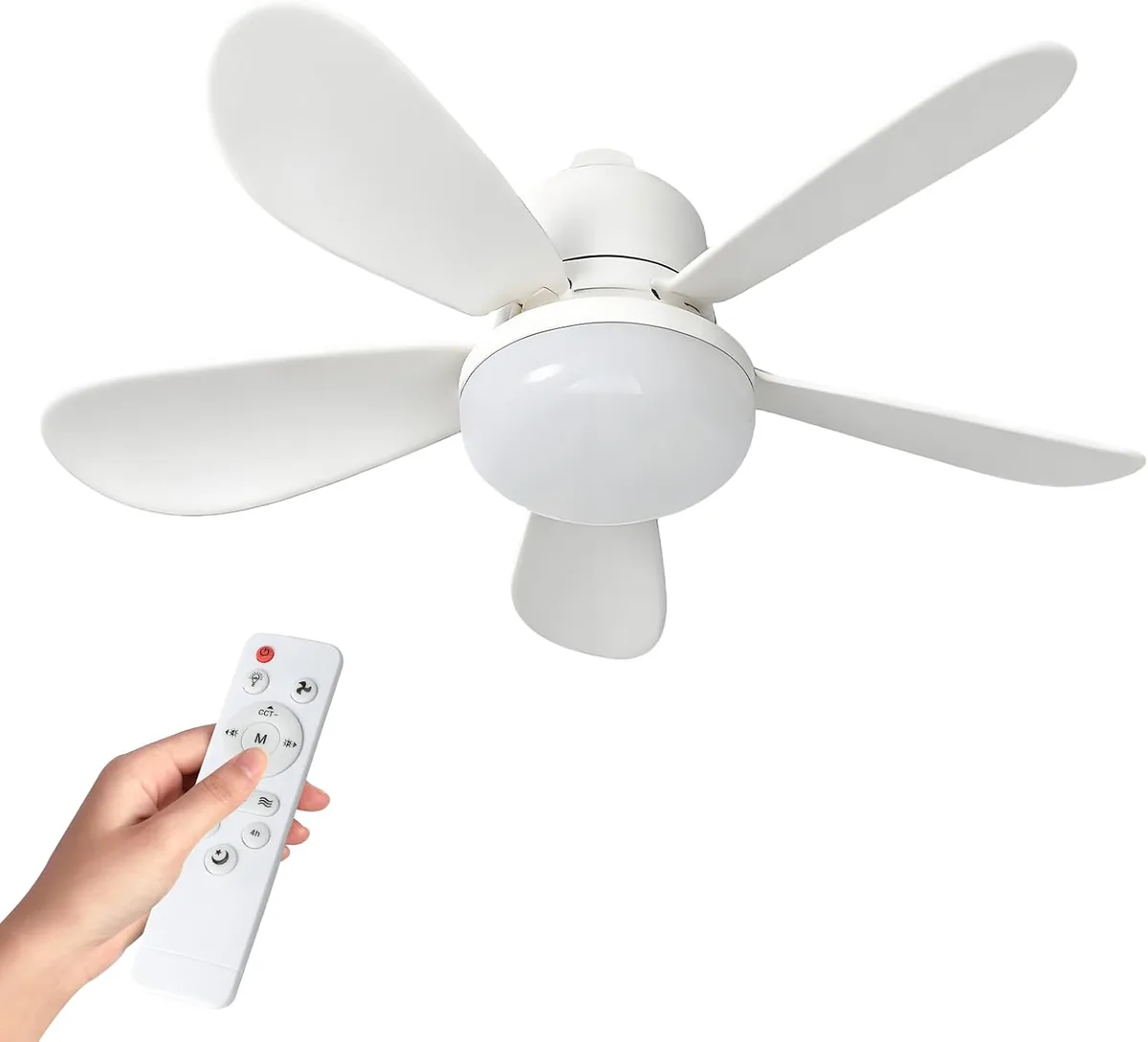
The remote has these buttons: light on/off, fan on/off, brightness up and down, warmth up and down, fan slow, medium and high, and 1, 2 and 4 hour timers. The IR is sent by Broadlink boxes, a mixed bunch bought cheap on eBay: an RM Pro Plus in the bedroom, an RM Pro in the living room and an RM4 mini in the guest room that Home Assistant calls “Hand Cream”. One of them had been sitting in a drawer for years before I put it to work. The bedroom TV is a Sony driven by IR codes and a Chromecast. The bedroom aircon is IR as well.
None of them report anything back. The fans’ real remotes don’t get used any more. They’re in a drawer with the batteries out, so nobody can change a fan behind Home Assistant’s back.
Two Owners, One Fan
The Broadlink app’s link to Google is a separate world. Its devices have their own state, kept in Broadlink’s cloud, and there is no API that lets Home Assistant read or write it. I couldn’t sync the two. One had to go.
Google was the part I didn’t want to lose, because I like talking to the house. So the aim was to keep Google as the voice and phone front end, and have it talk to Home Assistant instead of Broadlink. Then there’s one state, and it lives in Home Assistant.
That left the question of how to get Home Assistant’s entities into Google Home. There are two routes:
- Home Assistant Cloud (Nabu Casa) is the paid service. It’s the least work, but it costs money every month, and this instance wasn’t signed in to it anyway.
- A Matter bridge is free and local. A small program publishes selected Home Assistant entities as Matter devices, and Google Home adds it like any other Matter gadget.
I took the bridge. My earlier Matter attempts, with some Govee bulbs, hadn’t gone well, so I wasn’t certain it would work. This time it did.
Matter Hub in Docker
HAMH started life as t0bst4r/home-assistant-matter-hub, which is now archived. The maintained fork is RiDDiX/home-assistant-matter-hub. I pinned it to version 2.0.59 rather than latest.
Home Assistant here runs in Docker with no Supervisor, so there are no add-ons, and the hub is its own container. Matter needs mDNS and IPv6 on the LAN, so it uses host networking:
services:
  matter-hub:
    image: ghcr.io/riddix/home-assistant-matter-hub:2.0.59
    container_name: matter-hub
    network_mode: host
    restart: unless-stopped
    env_file: .env          # HAMH_HOME_ASSISTANT_ACCESS_TOKEN lives here
    environment:
      HAMH_HOME_ASSISTANT_URL: http://homeassistant.local:8123
      HAMH_MDNS_NETWORK_INTERFACE: eno1
    volumes:
      - ./data:/data
The token in .env is a dedicated long-lived one for the hub, not my admin token, and the file is readable only by my user. Claude created it over the Home Assistant websocket API and wrote it straight to the file without printing it.
A bridge is a name, a port and a filter saying which entities to publish. I created mine over the hub’s REST API:
{
  "name": "Fans and lights",
  "port": 5540,
  "filter": {
    "include": [
      { "type": "pattern", "value": "fan.fan_*" },
      { "type": "pattern", "value": "light.fan_light_*" },
      { "type": "pattern", "value": "switch.bedroom_tv" },
      { "type": "pattern", "value": "switch.aircon" }
    ],
    "exclude": []
  }
}
The hub then shows a pairing code. In Google Home you add a Matter device, type the code, and the bridge and everything in its filter appear. Eight devices now, in total.
Making Assumed State Honest
Publishing an IR device to Matter means giving it a state, and for IR there’s only one honest answer: whatever Home Assistant last sent. So that’s what each device holds.
Every fan, fan light, the TV and the aircon has an input_boolean for its assumed state. A template entity on top reads the boolean and, when asked to change, sends the IR code and sets the boolean. For the lights it looks like this:
- light:
    - unique_id: fan_light_guest_room
      name: "Fan light Guest Room"
      state: "{{ is_state('input_boolean.fan_light_guest_room', 'on') }}"
      turn_on:
        - if: "{{ is_state('input_boolean.fan_light_guest_room', 'off') }}"
          then:
            - action: remote.send_command
              target: {entity_id: remote.hand_cream}
              data: {command: ["b64:<learned light code>"]}
        - action: input_boolean.turn_on
          target: {entity_id: input_boolean.fan_light_guest_room}
The if is the important bit. The remote has one toggle code, so turning something on that Home Assistant already thinks is on must send nothing. Without that guard, a second “on” from Google would switch the light off.
This also fixes something I’d always disliked: a boolean has a definite value and survives a restart, where a bare template entity comes up as “unknown”. And if the record is ever wrong, I can correct it by flipping the boolean in Home Assistant. That sends no IR. It just changes what Home Assistant believes.
Brightness and Warmth in Five Steps
The remote has brightness up and down and warmth up and down. I wanted Google to be able to say “set the fan light to 50%” and get a sensible result.
The first job was finding out how many steps there are. I put the fan light on, and Claude sent 25 “dimmer” presses to hit the bottom. It then sent one “brighter” every 1.5 seconds. I watched the light and reported that I’d seen it get brighter, which turned out to be useless, because I hadn’t counted. We did it again, going down this time, one press every two seconds, and I counted four visible changes. That’s five levels. Warmth was the same: four steps.
Then the steps went into a script, fan_ir, with a level from 0 to 4 for each control, stored in an input_number. Asking for a target level sends the difference. Asking for either end sends four presses regardless of what Home Assistant thought the level was. As far as I can tell the controls stop at the ends rather than wrapping, so the extra presses do no harm. That makes the ends self-correcting: a drifted level gets fixed every time someone goes to full brightness or to the lowest.
Home Assistant’s template light has level and temperature templates with set_level and set_temperature actions. One quirk cost me a test run. When a request changes brightness and colour temperature together, which is what a Google “make it bright and warm” does, Home Assistant runs only the set_temperature action and passes the brightness along as a variable. My first version set the warmth and ignored the brightness. The fix was to have set_temperature apply the brightness itself.
A smaller one: Home Assistant rejected a request for 2702 K with a 400 error. Presumably the light’s minimum, which converts from 370 mireds, is a hair above 2702 K. Asking for 2800 worked.
Fan Speed and Timers
Slow, medium and high become 33%, 66% and 100% on a fan with three speeds. The Fan tile on each room page has a speed slider, and Google shows speed controls too.
The timers were more fun. Matter has no timer, so I used Home Assistant’s fan preset modes, which show up as buttons on the dashboard tile. Pressing “2h” sends the 2 hour code and starts a real Home Assistant timer, and the preset should highlight while it runs. When it ends, the fan has switched itself off, and a small automation marks it off in Home Assistant too:
- alias: Fan timer finished
  triggers:
    - trigger: event
      event_type: timer.finished
  conditions:
    - condition: template
      value_template: "{{ trigger.event.data.entity_id.startswith('timer.fan_') }}"
  actions:
    - action: input_boolean.turn_off
      target:
        entity_id: input_boolean.{{ trigger.event.data.entity_id.split('.')[1] }}
I tested the timer-finishing logic with a three-second timer and no IR. I haven’t yet used the timer buttons on a real fan, and I expect Google not to show them, since Matter has nothing to carry them.
Where It Went Wrong
I blamed Google for a problem in the hub. I paired the bridge when the fans and lights were plain on/off entities, then added speed, brightness and colour afterwards. Google kept showing on/off. I assumed it read a device’s capabilities once, when the device was added, so I removed the bridge and added it again. Nothing changed. The problem was on the hub side: it was still offering each light as OnOffLight and each fan as OnOffPlugInUnit, because it had worked those types out before the entities gained their extra features. Restarting the container made it offer ExtendedColorLight and Fan, and Google then showed brightness and speed. I removed and re-added the bridge once more after that, but I never tested whether that step was needed. When I added the aircon later, it simply appeared in Google with no re-adding at all. So the restart was the fix, and I suspect my re-pairing was wasted effort built on an assumption I hadn’t checked.
One of the fan codes was broken from the start. I tapped speed 1 and nothing happened. Speed 2 turned the fan on. Speed 3 made it faster. Then slow again, and nothing. Claude decoded the learned codes into their pulse timings. Every working code starts with a long burst, a leader of about 290 and 145 units. All three of my captures of the slow button were missing it. The first was a suspiciously short 36 characters, so we threw it away. The second and third were the right length, which hid the problem.
The fix was to put the leader back. A Broadlink code is a 0x26 byte, a zero, a two-byte length, and then the pulse timings in units of about 32.8 microseconds, with any pulse over 255 written as a zero followed by two bytes. Before trusting an encoder I’d just written, I fed five of the known-good codes through it and checked they came back identical, which they did once I stopped padding the output. Then I sent the repaired slow code. It started the fan on slow.
Meanwhile, because the slow presses did nothing, Home Assistant’s idea of the fan had wandered away from the real one. It said “on, slow” while the fan stood still and off. I corrected that by flipping the boolean. The deeper lesson is that the assumed-state model is only as good as the codes behind it.
The hub had no password. HAMH’s web interface and API were open to anything on my network, and the pairing code is on its front page. I put a password on it. That immediately made my own API calls return 401 Unauthorized, which is how I found out it worked. The credentials now sit in a file only my user can read, which I can point Claude at when I want a bridge change made.
Working With Claude Code on This
Much of what worked is the same as in my other posts, so I’ll keep it short. It read the hub’s schema and the Home Assistant source for how template lights handle combined requests, instead of guessing at option names. It decoded the IR timings to explain a button that did nothing, rather than asking me to learn it again and hope. And it kept saying which things it had tested and which it hadn’t. My own contribution was the usual one: some of my “I saw it work” reports were a lot less precise than a step count needs.
What I Haven’t Proved
- The aircon is a plain on/off switch for now. It has a lot more buttons, and it’s winter. I’ll turn it into a proper climate entity in summer. The plain switch appeared in Google without any re-adding, so I’ll find out then whether a change of device type needs it.
- Drift. With the real remotes in a drawer, the only way Home Assistant ends up wrong is a code that doesn’t land, like the slow button above. The record is still a guess, and a boolean flip is the fix. What changed is that Home Assistant and Google now agree with each other about what they don’t know.
Where It Stands
Google Home no longer owns anything. It sends commands to a Matter bridge, the bridge hands them to Home Assistant, and Home Assistant sends the IR and keeps the only record. The same record drives the dashboard sliders, the room pills and the voice control, so none of them can disagree with the others. The bridge has eight devices: three fans, three fan lights, the bedroom TV and the aircon.
Voice works better than I expected. In the bedroom I can say “Hey Dougal, turn on the fan light” and only the bedroom light comes on. It works out which one I mean without turning all three on, and I don’t have to say “Fan light Bedroom”. I haven’t tested why, but each device is assigned to its room in Google Home, and I’d guess that’s what it’s using.
I had no idea you could do this until this week. It wasn’t hard once it was framed as a question about who owns the state.