I’ve spent most of October replacing things that sit in my hand: the Harmony remote, an air mouse, a touchscreen. The bathroom mirror is a different sort of problem, because nobody holds it and nobody should have to touch it. The same shape applies, though. Home Assistant does the thinking, and something small and cheap does the showing.
This is a progress post. The mirror works, it isn’t finished, and the route to here took more turns than I expected.
Why the old one has to go
The mirror we have is about ten years old and cost roughly £400. It has a DAB radio that never got a decent signal, USB and SD playback, touch pads with an LED behind each one, a hand-wave light, and a 240V feed already in the wall. The silver backing is flaking. It has no Wi-Fi, so it can’t know anything about the day, and I’d like to play something other than whatever the DAB radio managed to find.
I’d also like it to stay a mirror. A tablet bolted to a wall is a screen that happens to reflect a bit. What I want is glass that looks like any other mirror until you walk up to it.
What I’m building
The parts are mostly things I already owned: a spare Raspberry Pi 3 B, a spare 22 inch Iiyama monitor, and an LD2450 mmWave radar I’d bought for something else. The glass is the one thing I have to buy, and I can’t undo it. A 600 by 800 mm sheet of two-way acrylic is just under £100, and stripping the silver from the old mirror isn’t reversible, so I’ve ordered a 100 by 100 mm sample first.
I set one rule early, which is that it has to be passive. There’s no touch screen in a bathroom, and nobody wants a mouse near a shower. The screen shows the time, the weather and what’s playing. For control I’m planning copper-tape pads under the glass, read by an MPR121 touch board, with a row of labels on the screen above them that change with what the pads do at that moment. Like the soft keys on a camera. A pad number goes to one script in Home Assistant, which decides what it means from the current mode, and the labels are generated from the same table, so the two can’t disagree.
How it hangs together
The Pi shows things, plays audio and reads two sensors. Everything else lives on my home server, where Home Assistant runs in a container alongside Music Assistant.
The Pi runs the display, MPD for internet radio, Squeezelite so Music Assistant can play to it, and two small services: one reads the radar, one will read the touch pads. The Pi logs into Home Assistant by being trusted on one IP address and mapped to a user who can’t change settings. The sensors report by webhook.
Music
Radio is MPD on the Pi, with a script in Home Assistant for the presets. YouTube Music goes through Music Assistant, which needs Premium, a cookie copied from a logged-in browser session, and a small container that makes the tokens YouTube wants before it will stream. My first cookie looked like a signed-out session and gave me tracks that weren’t mine. One from a private window signed in to just my account brought my library in, 28 playlists of it.
BBC streams carry no track information, so Home Assistant asks the BBC’s unofficial now-playing API, but only while the mirror is on a BBC stream. Commercial stations send their ad breaks as the track title, so for a while the mirror showed “STOP ADBREAK 1” in 72 pixel type. It now shows the station logo for those. Album art comes from iTunes, ranked so that “Hits of the 80’s” doesn’t win over the real album. On radio, Prev and Next step through the preset stations, since a live stream has nothing to skip.
Music Assistant has a quirk: press Next and it shows the new track, flips back to the old one for a moment, then settles on the new one. The mirror now waits for a change to hold still for a second or so before it swaps.
The fun part
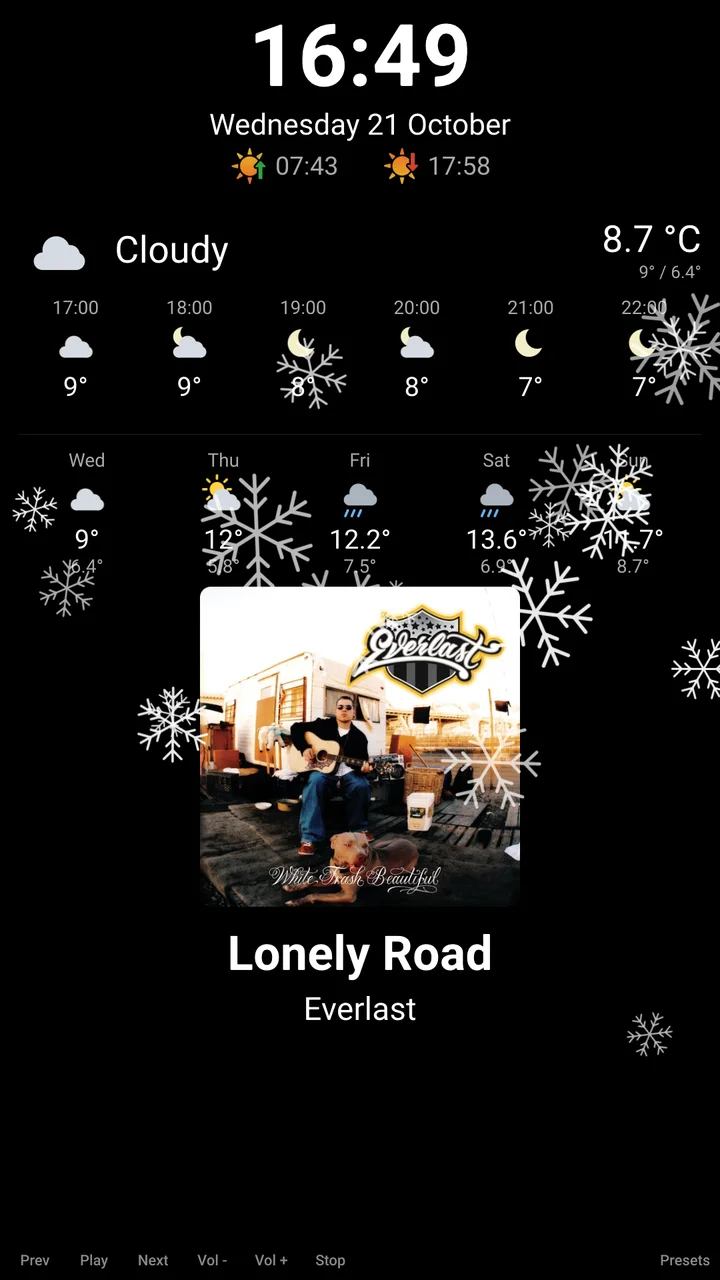
I wanted the screen to do something now and then. Snow in December. A ghost or a skull for Halloween, picked at random. A rain flurry when it’s raining, a sun that arcs across the screen when it’s sunny, clouds drifting over a small sun when it’s partly cloudy. They play when someone walks up, at most once every five minutes, and each one ends by itself.
The Pi 3 is not a race car
The first version was Chromium in kiosk mode pointed at a Home Assistant dashboard. It worked, and it was slow in several different ways. The dashboard took about 40 seconds to load, and its loading screen is a hard-coded light grey, so the mirror flashed white every boot. I replaced the dashboard with a small page of my own that talks to Home Assistant directly.
The animation was the real problem. Snow ran at 2.4 frames a second. The Pi’s display compositor was drawing on the CPU, which is Raspberry Pi OS’s default on the Pi 3, and rotating a 1080 by 1920 screen in software cost about 400 ms a frame. One line to switch it to the GPU took the same snow to about 40 frames a second.
From there I measured each step, with snow in frames a second and memory used by the whole Pi:
| Snow | Memory used | |
|---|---|---|
| Chromium | 34 | about 520 MB |
| Cog, a small WebKit kiosk browser | 56 | 387 MB |
| Native Qt app | 60 | 311 MB |
The averages understate it. Chromium’s bursts dropped frames and left gaps of up to a quarter of a second, and judder shows far more than an average does.
No browser at all
The native version is Python and Qt Quick, drawing straight onto the screen with no desktop and no browser. It’s a port of the same layout, so it looks identical. On a Pi 3, Qt drawing to the display directly holds 60 frames a second where the same app under a compositor tops out at 30 to 40. It boots to the Pi’s splash, then straight to the clock about 28 seconds after the kernel starts, with the weather and music filling in once the network arrives. The old setup took over a minute to reach a finished screen.
Getting there meant doing things a desktop normally does for you:
- Rotation. The monitor is mounted on its side. Qt’s own rotation setting only changed the window size on this Pi, so I rotate the whole scene inside the app instead.
- Blanking. With nothing running the screen, the app switches the monitor off itself through libdrm. The monitor goes properly to sleep, and its own menu appears when it wakes, which is how I knew it had worked.
- The boot splash. The splash holds the display until it exits, and Qt can’t take it over afterwards. The service asks it to quit first, leaving its picture up so there’s no flash of text console.
I kept the old setup as a safety net. If the native app fails five times in two minutes, systemd starts the desktop and browser by itself.
Where it went wrong
- I turned on DHCP on the Pi’s Ethernet. Radio, album art and weather all stopped. The port had picked up an address on a network with no internet and become the preferred route. It can now never be the default route.
- The ghost and skull never appeared. Logging a fade on the real screen showed its opacity jumping from start to end with nothing in between. The durations were bindings, and the animation started before they had updated, so every step took a millisecond. Setting the durations explicitly fixed it.
- The sound moved to the monitor. The monitor has speakers, and the default output wandered over to them when it slept and woke. The headphone jack is now pinned as the default.
Sound
The 3.5 mm jack is a headphone output, and the Pi 3’s is the weakest part of its audio. It can’t drive a passive speaker, so I need an amplifier. I’ve ordered a five-pack of MAX98357A boards for about £12, small I2S class-D amps that take digital audio straight from three of the Pi’s pins, and a 3 inch 4 ohm 5 W driver. Each board is mono, which is fine for a bathroom mirror. They arrive on Friday, and I’ve sketched a small sealed box for the speaker, though I won’t know its depth until the part turns up.
Where it stands
It works. The mirror shows the clock, the date, sunrise and sunset, the weather now, for the next six hours and for five days, and what’s playing with its artwork. It blanks when nobody’s there and wakes when I walk up, driven by the radar. The effects play. Radio and YouTube Music both work and don’t talk over each other. It boots straight into all of that and recovers if the network isn’t up yet.
I haven’t touched the pads, because the MPR121 board isn’t here. The glass sample hasn’t arrived either. Whether copper tape can sense through a metal-coated mirror depends on whether the coating conducts, and I can’t cut islands into it, so there’s a chance the pads simply won’t work and I’ll need a different sheet or a different input. The speaker is Friday’s job.
The next job is Friday’s amplifier, and after that the glass sample, which decides whether any of the pad plan survives.